Sudoku
Solve the classic number placement puzzle. Play this logic puzzle online—no download required. Mobile-friendly with hints, notes, and timed mode.
Introduction to Sudoku
Play Sudoku Online Now – Free 9x9 Logic Puzzle brings a crisp, modern take on the classic grid. This web-based puzzle game runs smoothly in your browser, with no download required, thanks to its polished HTML5 logic game foundation. You can jump in for a quick session or settle down for a longer think, and your progress feels satisfying from the very first placement.
This number placement puzzle is a calm yet absorbing brain teaser game. It’s a logic puzzle online where every move narrows the possibilities and reveals new paths through the 9x9 grid challenge. There’s no math beyond simple digits; you’re just using pure deduction. Prefer to practice anywhere? The experience works well on most devices and pairs neatly with printable logic puzzles if you like solving on paper too.
Quick Start
New to the grid? Here’s a quick way to begin and play free puzzle rounds without stress. Start at an easy difficulty so you can focus on learning the flow. Scan for singles, place a few confident digits, and watch the board open up. If you hit a wall, use notes, take a breath, and revisit each row, column, and box with a fresh angle.
- Choose a difficulty and open a fresh board.
- Scan each row and column for the most obvious placements.
- Use notes to pencil small candidates into empty cells.
- Fill certain numbers once they become unequivocal.
- Repeat the scan-and-place cycle until the grid is complete.
Game Setup
Before placing your first digit, customize the settings to match your comfort level. Toggle mistake highlights, enable or disable auto-notes, and pick a theme that’s easy on your eyes. Many school and office networks allow this title since it fits neatly into the category of unblocked puzzle games, making it a friendly option for quick breaks. Prefer pen-and-paper practice as a companion? Export or print a board and add it to your personal set of printable logic puzzles for offline sessions.
Basic Rules & Mechanics
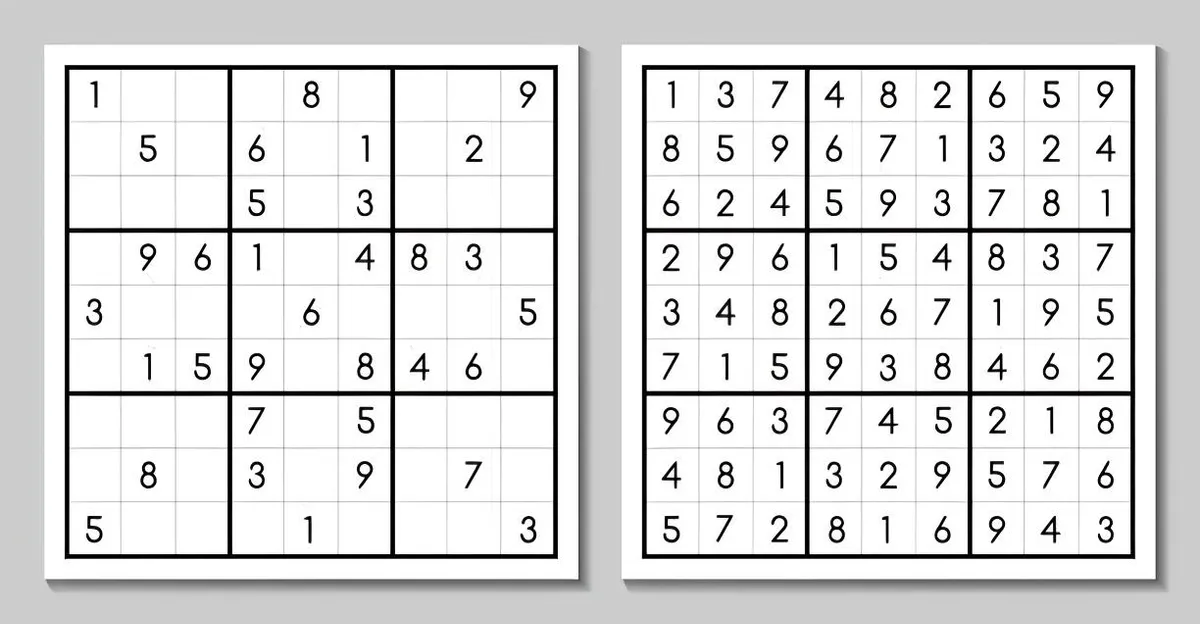
At its core, the goal is simple: fill every 9x9 board so each row, each column, and each 3x3 box contains the digits 1 through 9 exactly once. The challenge is in the reasoning. Look for contradictions and eliminate candidates that would repeat digits within a region. When only one candidate remains in a cell, place it with confidence. If two cells in a region can only be the same number, use that to guide further eliminations elsewhere.
- Rows must contain 1–9 with no repeats.
- Columns must contain 1–9 with no repeats.
- Each 3x3 box must contain 1–9 with no repeats.
- Every valid placement follows from logic, not guessing.
Controls & Input
Comfortable controls help you focus on deduction instead of fumbling with inputs. Use your mouse or touch to select a cell, then press a number key to enter a digit. Hold a notes toggle to switch between solid entries and small pencil marks. Arrow keys move your selection around the grid, and backspace clears an entry if the option is enabled. Quick, clean input ensures your attention stays on the reasoning that drives success in Sudoku.
Gamepad / Controller
Prefer a couch-friendly approach? Some browsers and devices map directional input to navigate cells while face buttons handle numbers via a radial selector. It’s not as swift as a keyboard for many players, but it’s perfectly fine for relaxed solving sessions. If you try a controller, pick a slower pace and lean on notes to keep candidates organized.
Objectives & Win Conditions
Your win condition is delightfully clear: complete the grid without breaking the rules. Some modes include timers or gentle mistake counters that nudge you toward accuracy. Others offer relaxed play with unlimited undos so you can explore lines of reasoning. The board is solved when every cell holds a confirmed digit, each region is valid, and no conflicts remain in the puzzle.
Modes & Variants
The classic 9x9 layout is the default, but you may find plenty of variants to keep your sessions fresh. Mini boards like 4x4 and 6x6 are great for warm-ups. Irregular layouts change box shapes for a twist. Diagonal modes add lines that must also contain 1–9. You might even see sum-cage styles where outlines indicate groups with specific totals. Whether classic or variant, everything rests on logical deduction, giving you a consistent, satisfying flow in Sudoku regardless of flavor.
How to Play Sudoku for Absolute Beginners
If you’re brand new, start by learning the three regions: rows, columns, and 3x3 boxes. Begin each round by scanning for digits that are almost complete. When a number appears eight times on the board, the final copy of that number must sit in a specific empty spot governed by its row and column rules. Focus on certainty, not guesswork. As your confidence grows, you’ll recognize patterns faster and turn the early game into a smooth setup for the midgame.
Step-by-Step Guide: Solving Your First 9x9 Grid
Start with a full scan: check 1 through 9 in each box and see where a missing number can legally go. Place a few singles, then reevaluate the same areas because each placement changes the rest of the board. Move from box to box, sweeping the grid in cycles. If a region feels stuck, switch to another area to maintain momentum. This disciplined loop turns the 9x9 grid challenge from daunting to doable, and your pace will naturally improve.
Essential Sudoku Terminology: Rows, Columns, Boxes
Understanding core terms speeds up your solves by giving structure to how you think about the board. Here are the essentials you’ll encounter while learning and practicing:
- Row: A horizontal line of nine cells that must contain 1–9 with no repeats.
- Column: A vertical line of nine cells that must contain 1–9 with no repeats.
- Box: A 3x3 region that must contain 1–9 with no repeats.
- Candidate: A possible digit that can legally occupy a given cell.
- Elimination: Removing a candidate when it conflicts with a placed digit in the same row, column, or box.
- Single: A cell where only one candidate remains after eliminations.
- Pair: Two cells in a region that share the same two candidates, a clue that drives further pruning.
Pencil Marks 101: Using Notes Like a Pro
Notes keep your thinking visible. When a cell could be two or three possibilities, jot them as small candidates. As you place confirmed digits nearby, those notes shrink until a single candidate remains. Power tip: keep your notes tidy and consistent so you can spy patterns at a glance. With good note discipline, Sudoku transforms into a conversation between what’s allowed and what must be true.
Solving Techniques: Naked Singles to Hidden Pairs
Early solving benefits from a few bread-and-butter tactics. Naked singles occur when only one candidate remains in a cell. Hidden singles happen when a number can only fit one cell within a row, column, or box even if that cell currently shows multiple candidates. Pairs tell you that certain digits must live in specific cells, letting you erase those digits from other cells in the same region. These simple tools carry surprising power and set up more advanced deductions later.
Intermediate Strategies: Pointing Pairs and Box-Line Reduction
When you’re comfortable with singles and pairs, try pointing pairs and box-line reduction. If a digit’s candidates within a box are confined to one row, you can remove that digit from the rest of that row outside the box. Likewise, if a digit’s candidates in a box sit only in one column, clear that digit from the rest of that column outside the box. These techniques squeeze the puzzle efficiently and frequently unlock cascades of progress in Sudoku.
Advanced Methods: X-Wing, Swordfish, and Beyond
As boards get tougher, structured patterns shine. X-Wing uses two rows and two columns where a digit appears exactly twice in each row and aligns in the same columns, allowing you to clear that digit from other cells in those columns. Swordfish extends the idea to three rows and three columns. Past these, you’ll find even deeper nets and chains, which reward patience and precise candidate tracking on complex Sudoku challenges.
Common Mistakes to Avoid in Sudoku Puzzles
Most errors arise from rushing or skipping checks. Don’t place a digit without confirming it’s legal in the row, column, and box. Avoid cluttered notes that hide important patterns. Refrain from guessing when logic is available; a quick rescan with fresh eyes often reveals a single you missed. Above all, keep your process consistent. A steady routine turns tricky boards into manageable steps and makes every solve feel fair, earned, and fun in Sudoku.
Single-Player vs Multiplayer
In single-player, Sudoku is a cozy, reflective space. You settle in, scan the grid, and let logic guide you. Want a little pressure? Switch to a timed mode and race the clock. Prefer collaboration? Some platforms add asynchronous multiplayer: solve the same seed as your friends and compare results after. Real-time matches also exist, where both players start a fresh puzzle and the fastest clean finish wins. It’s still the same Sudoku brain-teaser, just with a competitive twist.
Single-player suits deep focus, pattern recognition practice, and careful pencil mark notes. Multiplayer heightens excitement—share a code, pick a difficulty, and go head-to-head. Whether you aim for a personal best or a friendly duel, Sudoku adapts. And with leaderboard competition, even solo runs feel social; your time, accuracy, and streak can stack up against the world.
Key Features
- Daily tracks: a daily puzzle challenge for consistent practice and motivation.
- Difficulty ladder: Easy through Expert, so Sudoku always feels just-right.
- Assist tools: a fair hint system, conflict checks, and clean undo/redo.
- Notes mode: tidy pencil mark notes for candidates and deductions.
- Versatile modes: relaxed, timed mode, streaks, and hardcore mistakes-off.
- Accessibility: color themes, high-contrast, and number highlights.
- Responsive design: smooth, mobile-friendly gameplay on any screen.
- Competitive layer: global leaderboard competition and friend challenges.
- Offline options: print grids or use an offline puzzle mode when needed.
- Learning aids: embedded strategy tips for puzzles to grow your skills.
Sudoku Characters & Abilities
There aren’t literal characters in Sudoku, but your toolkit feels like a cast of heroes. Candidates are your scouts, scanning each cell. The eraser fixes missteps. The highlighter calls attention to a specific digit across the board. And the hint? That’s your sage mentor—best used sparingly for sustainable growth. When Sudoku gets tough, these abilities help turn confusion into clarity.
- Candidate notes: leave neat pencil mark notes to test hypotheses.
- Digit highlight: spotlight all 3s, 7s, or any number at once.
- Error check: optional conflict alerts if a number breaks the rules.
- Step replay: some platforms include step-by-step history to study your path.
Items & Power-Ups
Think of quality-of-life tools as power-ups for Sudoku. The hint system nudges you toward a logical step, not a random solution drop. Mistake limits can add pressure or help track accuracy. Auto-cleanup removes candidates that are no longer valid after a placement. And dark mode reduces eye strain during late sessions. Used wisely, these features refine your decision-making without stealing the fun of discovery.
- Hint tiers: from mild logic nudges to revealing a specific cell (you choose).
- Candidate cleanup: tidy notes automatically after correct placements.
- Guided learning: inline strategy tips for puzzles appear as you play.
- Timer toggles: turn on timed mode for thrills, off for mindful practice.
Levels & Progression
Progression in Sudoku isn’t about loot—it’s about mastery. Easy puzzles introduce fundamentals, while Medium and Hard blend more advanced techniques. Expert throws in patterns like X-Wing or swordfish, rewarding steady study. Some platforms track your journey with stars, badges, and streaks. The longer you keep a daily run alive, the more satisfying your sense of growth becomes in Sudoku.
This steady curve makes Sudoku a perfect cognitive training game. You develop visual scanning, deduction, and memory. Every level up feels earned because your brain did the heavy lifting. Your scoreboard isn’t just time; it’s the evolution of your reasoning.
Leaderboards & High Scores
High scores in Sudoku combine speed, accuracy, and consistency. A clean board with zero mistakes typically ranks higher than one hammered out sloppily. In leaderboard competition, two players might finish within seconds of each other, but the one with fewer hints and fewer errors takes the crown. Want better ranks? Practice in timed mode, but avoid reckless placements. Precision matters.
- Score factors: completion time, mistakes (or lack thereof), hints used, and streaks.
- Tip: lock in fundamentals on Easy/Medium, then chase Expert PBs.
- Streak bonus: defend your daily streak to climb seasonal boards.
Video & Display Options
Comfort boosts performance in Sudoku. Tweak grid size, font weight, and contrast. Turn on number highlighting or crosshair focus to see row/column alignment. Try a darker theme to reduce fatigue, or a high-contrast theme to improve legibility. For tiny screens, enable compact mode so digits don’t feel cramped. These small adjustments prevent misclicks and keep Sudoku satisfying for longer sessions.
Sudoku Fullscreen Mode
(press Fullscreen button under the game window)
Fullscreen cuts distractions and gives Sudoku the breathing room it deserves. Your eyes track candidate patterns more easily, and finger taps land exactly where you intend. It’s a simple switch with big payoffs for both speed and accuracy.
Difficulty Levels Explained: Easy, Medium, Hard, Expert
Each tier changes how you decode Sudoku. Easy focuses on singles and basic elimination—perfect for warmups and pattern recognition practice. Medium introduces more interplay between rows, columns, and boxes. Hard often requires pairs, triples, and subtle contradictions. Expert leans on advanced chains and rare patterns. Don’t rush through tiers; the best foundation for Expert is crisp fundamentals built over time in Sudoku.
- Easy: practice scanning and placing singles without pressure.
- Medium: learn naked and hidden pairs; tighten your notes.
- Hard: apply advanced eliminations, watch interplay across units.
- Expert: master chain logic; keep the hint system for post-analysis.
Time Attack and Speed-Solving Tips
Speed fans, gather round. Start with digit sweeps—scan for a single number across the whole Sudoku grid to rack quick placements. Keep notes consistent; messy candidates cost seconds. Use keyboard or quick-select gestures if available. In timed mode, play aggressively but verify each move to avoid error penalties. The real trick? Flow. Don’t tunnel on one area; if a section stalls, pivot to another.
- Warm up on Medium to sharpen reactions before Expert Sudoku runs.
- Toggle highlights to find missing digits fast.
- Practise micro-routes: place, update notes, sweep, repeat.
- Review replays to spot bottlenecks and refine splits.
Daily Challenges and Streak Rewards
The daily puzzle challenge nudges you to keep a rhythm. Solve a fresh Sudoku each day to earn streak rewards—badges, titles, or seasonal ranks. It’s accountability with a fun payoff. Missed a day? Some platforms offer catch-up tokens. Streaks are a gentle way to turn Sudoku into a positive habit and steady cognitive training game without overwhelming your schedule.
Accessibility Options: Color Themes & High-Contrast Mode
Accessibility isn’t a bonus; it’s essential. Choose palettes that reduce eye strain, enable high-contrast edges for clarity, and try color-blind-friendly themes. Adjustable line thickness and a clear font keep Sudoku readable at a glance. With the right setup, long sessions feel easier, and you’re less likely to misread digits when the pressure rises late in a Sudoku race.
Mobile Tips: Playing Sudoku on Phones and Tablets
On small screens, precision is king. Use larger buttons, haptic taps, and number-highlight tools for error-free input. Landscape mode can offer a wider view; portrait may keep numbers closer to your thumb. Thanks to mobile-friendly gameplay, you can keep up streaks on the go. If you’re speed-running Sudoku, disable pop-ups and keep the keyboard docked to reduce tap travel.
- Enable crosshair focus to align rows and columns in Sudoku faster.
- Use quick toggles to switch between placement and pencil mark notes.
- Save battery with dark mode during long commutes.
Offline Play: Printable Grids and Download Options
No signal? No problem. Use offline puzzle mode to cache a few Sudoku boards for travel, or print a batch of grids for paper runs. Many sites support clean print layouts with generous margins for handwriting candidates. If you prefer apps, download a pack that stores puzzles locally, tracks stats offline, and syncs them later. Sudoku thrives online and off—your routine stays intact.
Compete with Friends: Leaderboards and Social Sharing
Make Sudoku social with direct friend challenges. Share a puzzle seed or a completion link; now everyone solves the same board and compares times. Post your PB to a club channel, or form a weekly ladder. With leaderboard competition, your team can track progress, celebrate streaks, and learn from post-game reviews. It’s collaborative growth wrapped in friendly rivalry, keeping Sudoku fresh and motivating.
Variants to Try: Killer, Jigsaw, Hyper, and 16x16
When you’re ready to branch out, variants spice up Sudoku logic:
- Killer: cages with sums add arithmetic constraints—great for pattern recognition practice.
- Jigsaw: irregular regions bend spatial reasoning in surprising ways.
- Hyper: extra 3x3 zones overlap the grid, adding second-layer checks.
- 16x16: a mega-grid that rewards stamina and tidy notes in Sudoku.
Try them for variety, then bring the lessons back to classic Sudoku. You’ll notice faster reads, sharper deductions, and more confidence under pressure. Each variant deepens your logic toolkit, which pays dividends when you return to Expert runs and chase that elusive leaderboard jump.
Bottom line: whether you’re playing casually or pushing for PBs, customizing settings, embracing daily habits, and exploring variants will keep Sudoku engaging for the long haul. Layer in smart tools like a disciplined hint system and tight notes, and you’ll feel steady growth day after day.
Performance & Troubleshooting
If your Sudoku board feels laggy or inputs don’t register, don’t worry. Because it’s an HTML5 logic game running in your browser, a few quick tune-ups usually restore silky play. This web-based puzzle game is lightweight, no download required, and designed for mobile-friendly gameplay as well as desktops. The tips below target common hiccups without touching your progress.
- Refresh the page and relaunch the puzzle. A fresh session clears minor memory snags that can slow a 9x9 grid challenge.
- Update your browser. The latest Chrome, Edge, Firefox, or Safari versions run logic puzzle online experiences more efficiently.
- Disable heavy extensions. Ad blockers, script managers, and VPN add-ons can interfere with inputs, the hint system, or sounds.
- Clear site data for this page only. Cached scripts sometimes conflict after an update; a light clear helps.
- Toggle animations and effects. If frame drops appear, switch off fancy transitions to focus on pure number placement puzzle logic.
- Resize or reset zoom. If tap targets feel off on tablets, set browser zoom to 100% and rotate the device once.
- Check device power mode. Low-power settings throttle performance; normal mode improves responsiveness.
- Keyboard not responding on desktop. Click once on the board to focus it, then use number keys for swift entries.
- Notes not showing. Enable pencil mark notes in settings; on touch screens, a long press typically toggles note entry.
- Timer pressure too high. Turn off timed mode or enable Relaxed play so you can think clearly without a ticking clock.
- Lost progress. Ensure cookies are enabled and you’re not in private browsing; some boards store local saves only.
- Sound issues. Toggle mute in-game first, then verify your device output and tab-level audio settings.
Still stuck? Try a different device or network to isolate the cause. And if your goal is better solving accuracy, not speed, consider switching on gentle highlights and using intentional strategy tips for puzzles to avoid misclicks.
Where can I play Sudoku unblocked?
If your school or workplace filters games, look for reputable portals that host unblocked puzzle games via standard HTTPS. Choose sites that serve Sudoku as a clean, web-based puzzle game with no download required. When in doubt, ask your network administrator for a list of approved learning and brain-training resources. Many organizations allow constructive brain teaser game content because it supports focus and pattern recognition practice.
Traveling or using a shared computer? Favor trusted hubs with a strong track record for educational play. If access is restricted, consider personal mobile data on your phone to play free puzzle sessions responsibly. Always follow local IT policies, and never bypass security rules.
Play on Phones & Tablets
Modern Sudoku layouts adapt to small screens with mobile-friendly gameplay. Use tap-to-select cells, swipe between blocks, and long-press to toggle pencil mark notes. Prefer a calm session on the couch? Disable timed mode, enable larger digits, and keep gentle highlights on. If you’re chasing consistency or practicing for leaderboard competition later on desktop, set identical assist options on your phone so your technique transfers flawlessly.
Pro tip: When you’re playing outdoors, increase screen brightness and switch to a high-contrast theme to keep the grid crystal clear. If your device supports it, add the game to your home screen for quicker access and smoother loading.
Play Sudoku Offline
Need a flight-friendly fix? Some versions include an offline puzzle mode that lets you keep solving even without a connection. Open a few boards while online and they’ll remain accessible. For pen-and-paper fans, print a batch of printable logic puzzles and bring a pencil for classic note-taking. Offline options are perfect for long trips, waiting rooms, or tech-free breaks.
Remember that daily puzzle challenge features may require connectivity to fetch new boards or sync stats. If you’re planning to play offline all day, load several grid difficulties beforehand so you’ve got variety. And when you’re back online, your progress and streaks can sync up in seconds.
Is Sudoku Safe to Play?
Yes. This is a quiet, family-friendly brain teaser game with no combat or chat rooms. The experience emphasizes logic and attention rather than fast reflexes. As with all online activities, stick to trustworthy sites that clearly state privacy practices. When playing a logic puzzle online, look for HTTPS in the address bar and avoid unnecessary permissions.
Parents: kid-oriented options like limited hints, bigger buttons, and simplified inputs make the board more approachable. Many versions also keep data local on the device. If a site offers account features or leaderboard competition, review settings together, set a nickname that preserves privacy, and keep gameplay time balanced.
Games Like Sudoku
If you love the feel of a number placement puzzle but want a fresh twist, try these analytical gems. Most are easy to find as web-based puzzle games and many let you play free puzzle rounds:
- Kakuro: Cross-sums that blend arithmetic with deduction.
- KenKen and Calcudoku: Grid math constraints meet pure logic.
- Killer Sudoku: Cage sums add a tactical layer to standard rules.
- Futoshiki: Inequality signs guide you toward valid placements.
- Hitori: Remove duplicates to clean up each row and column.
- Skyscrapers: Clues around the edge reveal building heights inside the grid.
- Nonograms and Picross: Fill or leave squares to uncover pixel art.
- Hidato: Link consecutive numbers through the grid for a dynamic path-finding spin.
- Slitherlink and Nurikabe: Territory-based logic with elegant constraints.
Many of these titles also appear as daily puzzle challenge selections, perfect for maintaining a steady, brain-healthy routine.
Brain Benefits: Memory, Focus, and Pattern Recognition
Regular Sudoku sessions sharpen working memory, attention control, and pattern recognition practice. You’ll learn to spot hidden structures in the 9x9 grid challenge and hold multiple possibilities in mind without losing the thread. That’s why so many solvers treat it as a favorite cognitive training game: the feedback loop is immediate, the goals are clear, and the incremental wins feel great.
Over time, you’ll internalize symmetric patterns, spot singles faster, and scan more efficiently. The result is a quiet confidence that translates to daily tasks requiring focus, sequencing, and careful verification.
Family-Friendly Play: Kids Mode and Gentle Hints
With kids mode, the board uses larger buttons, calmer colors, and forgiving input. Combine that with a subtle hint system and you’ve got a friendly way to learn without giving the answer away. Pencil mark notes encourage thinking ahead while keeping mistakes reversible, and bite-size strategy tips for puzzles appear at just the right moments. It’s a supportive space for new players to enjoy Sudoku and for families to play free puzzle rounds together after dinner.
If your child enjoys hands-on learning, print a sheet or two and compare solving strategies. Share a few fun mini-goals, like filling all corner boxes first, to nurture curiosity and persistence.
Customization: Themes, Fonts, and Note Styles
Make the board your own. Choose a dark or paper-white theme, switch to a dyslexia-friendly font, and pick your favorite note layout. Because it’s an HTML5 logic game, these visual tweaks apply instantly across devices and preserve your comfort settings. Prefer long, quiet sessions? Disable timed mode, reduce animations, and keep only the highlights that truly help. Fans of mobile-friendly gameplay can enlarge inputs, move the number pad for one-handed reach, and enable tap-and-hold actions that speed up note entry.
The result is a tailored, distraction-free space where your logic can shine. Small visual changes often lead to big gains in accuracy and flow.
Fair Play & No-Guess Solving Philosophy
The heart of Sudoku is clean deduction. Every move in a number placement puzzle should have a reason. That’s the no-guess philosophy: use constraints, not coin flips. A solid logic puzzle online gives you all the information up front and celebrates clear thinking, not luck. If you’re practicing for leaderboard competition, this mindset matters even more. You’ll move confidently because each placement arises from sound logic, not a hunch.
Embrace the process: scan for singles, track pairs, and refine candidates. With time, your toolkit grows from basics to advanced patterns that unlock even the trickiest grids.
Final Thoughts
Whether you’re sneaking in a two-minute warm-up or mastering an extreme board, Sudoku shines as a timeless companion. It’s a web-based puzzle game you can open anywhere, with no download required, quick load times, and options for both relaxed thinking and competitive play. If your network is strict, seek reputable portals that list unblocked puzzle games. Traveling or conserving data? Switch to offline puzzle mode or print a set of printable logic puzzles for a cozy analog session.
When you’re ready, tap into a daily puzzle challenge to build rhythm and reinforce skills. Keep notes neat, lean on the hint system only when you’re truly stuck, and enjoy the gentle momentum of deliberate reasoning. Above all, have fun. The grid rewards patience, and the satisfaction of a clean solve never gets old.